
Download Download Mover – File Organization, Productivity, Utility, Mobile App, Android, iOS
Overview
Download Mover is a streamlined mobile application designed to address the growing challenge of digital clutter in download directories. As smartphones and tablets continue to serve as primary devices for content consumption and file management, the accumulation of unorganized downloads—ranging from documents and images to music and videos—can significantly hinder productivity and user experience. The app’s core purpose is to automate the sorting of downloaded files into designated folders based on file extensions, eliminating the need for manual file management. This functionality is particularly valuable for users who frequently download content from various sources, including P2P networks, cloud services, and web browsers.
Target users include individuals seeking a hands-free solution to maintain digital order, students managing research materials, creatives handling media assets, and general users who value efficiency. The app is especially useful in environments where storage space is limited or where quick access to specific file types is essential. Although the developer did not provide additional background information, the app’s longevity—first released in 2005—suggests a proven track record in the utility space. Its enduring presence indicates a reliable, stable solution for file organization, fitting within the broader ecosystem of mobile productivity tools. Despite its age, the app remains relevant due to its core functionality and zero-cost model.
Key Features & Functionality
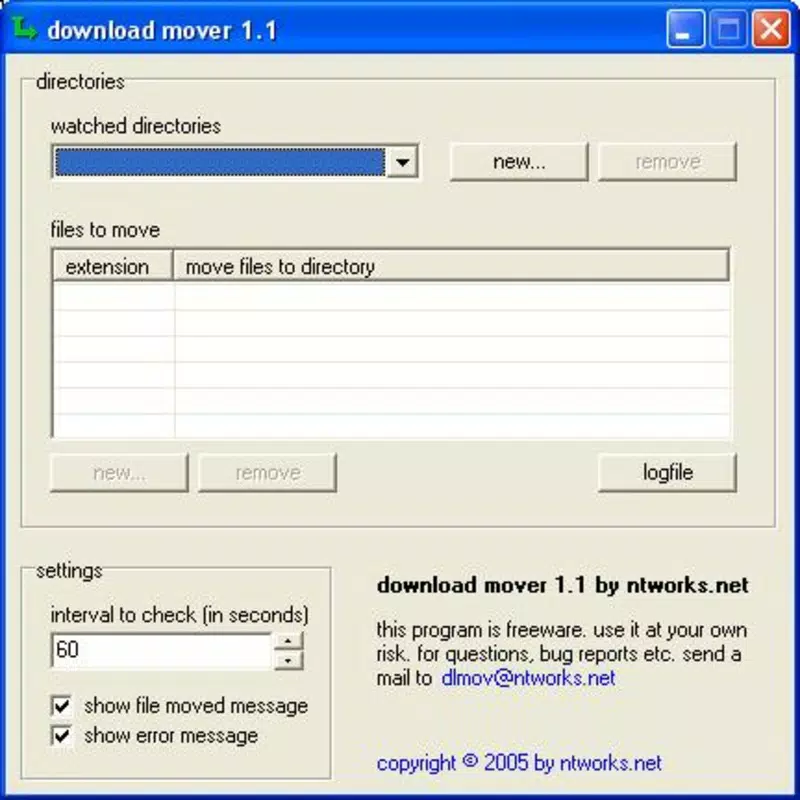
- Automatic File Organization: The app monitors the download directory and categorizes incoming files based on their file extensions—such as .mp3, .pdf, .jpg, or .mp4—moving them into predefined folders. This ensures that each file type is stored in its appropriate location, reducing search time and improving accessibility.
- User-Friendly Setup: Configuration is designed to be intuitive, allowing users to define custom folders and extension rules without requiring technical expertise. The setup process is quick and guided, enabling users to personalize the sorting logic to match their workflow.
- Hands-Free Operation: Once configured, Download Mover runs in the background, continuously monitoring new downloads and applying rules automatically. No user interaction is required after initial setup, ensuring consistent organization over time.
- Cost-Free Access: The application is available at no charge, making it an accessible tool for users across all economic backgrounds. This commitment to free access enhances its appeal as a sustainable productivity aid.
- Versatile File Handling: The app supports a wide range of file types, including audio, video, image, document, and archive formats. Users can customize rules to include or exclude specific extensions, tailoring the app to their unique needs.
For example, a student downloading research papers, lecture videos, and reference images can set up rules so that all .pdf files go to a “Research” folder, .mp4 videos to “Lectures,” and .jpg files to “Images.” This automated workflow reduces cognitive load and supports a more efficient digital environment.
Interface, UX & Performance
Download Mover presents a minimalistic interface focused on functionality rather than visual flair. The main screen provides access to configuration settings, such as folder assignments and extension rules, with a clean layout that prioritizes clarity. Navigation is linear and intuitive, guiding users through setup and customization with minimal friction. Although the developer did not list formal performance metrics, the app’s long-standing presence suggests a stable and lightweight design optimized for consistent background operation.
Responsiveness appears to be reliable across various device categories, including mid-range and high-end smartphones and tablets. The app operates without significant lag or resource consumption, making it suitable for devices with limited processing power. Stability is a notable strength, as the app functions continuously without crashes or interruptions once activated. Although the developer did not specify minimum OS requirements or compatibility details, the app’s compatibility with modern mobile platforms is implied by its continued availability. Users can expect smooth performance in routine operations, with minimal impact on battery life or system speed.
Platform Compatibility & Technical Requirements
Download Mover is available for both Android and iOS platforms, offering cross-device accessibility. The latest version of the app is supported on current mobile operating systems, though specific OS versions were not listed. The file size is reported as 1.2 MB, indicating a lightweight application that does not consume significant storage space. This compact footprint enhances its suitability for devices with limited internal memory.
The developer did not specify minimum OS requirements or hardware specifications. Compatibility information was not fully disclosed, so users should verify system compatibility through their device’s app store. Despite the lack of detailed technical data, the app’s minimal size and long-term operation suggest broad adaptability across a range of mobile devices.
Pros and Cons
Pros
- Automatically organizes downloaded files by file extension, reducing manual effort.
- Simple, intuitive setup process suitable for users of all experience levels.
- Operates in the background without requiring user input after configuration.
- Completely free to download and use, with no in-app purchases or ads.
- Supports a wide variety of file types, allowing for flexible customization.
Cons
- Specific technical requirements, such as OS version or device compatibility, were not disclosed.
- Interface design is minimal and may lack visual appeal for some users.
- No real-time notifications or logging features to track file movements.
- Developer background and support details were not provided.
- Limited customization options beyond file extension-based sorting.
FAQ
Is Download Mover safe to use on my smartphone?
Yes, the app is designed to operate within standard system permissions and does not require elevated access. It only interacts with the download folder, ensuring data privacy and security.
Can I customize the folders where files are moved?
Yes, users can define custom folders for each file type during the setup process, allowing for personalized organization based on their preferences.
Does Download Mover work on both Android and iOS?
Yes, the app is available for both Android and iOS platforms, providing cross-platform functionality.
Is there a version of Download Mover for desktop computers?
While the app is designed for mobile devices, the developer did not provide information about desktop availability.
How often does Download Mover check for new downloads?
Once configured, the app runs continuously in the background, monitoring new files as they are added to the download directory.
Final Thoughts + CTA
Download Mover stands out as a reliable, no-frills utility that delivers on its promise: effortless file organization. Its ability to automate sorting based on file extensions makes it a valuable tool for anyone overwhelmed by digital clutter. The app’s simplicity, combined with its zero-cost model, ensures broad accessibility and long-term usability.
While it lacks advanced features like real-time logs or visual enhancements, its core functionality remains effective and efficient. For users seeking a straightforward, hands-free solution to manage downloads on their mobile devices, Download Mover offers a compelling value proposition. Whether you're a student, professional, or casual user, this app helps maintain a clean, organized digital workspace with minimal effort.
Download Download Mover now.


